
Why a Modern AI Coloring Tool Matters in 2025
Coloring has long been a therapeutic pastime for children and adults alike, but traditional books limit creativity to pre‑drawn outlines. In a world where personalization drives every digital experience, the ability to generate custom coloring pages on demand is a game‑changer. Whether you are a parent seeking fresh activity sheets for a rainy afternoon, a teacher looking for themed worksheets that match a lesson plan, or an adult searching for intricate mandalas to unwind after a long day, a flexible, web‑based solution can save time, reduce costs, and spark imagination.
The rise of generative AI has made it possible to turn simple text prompts or personal photos into clean, printable line art in seconds, eliminating the need for expensive graphic‑design software or manual tracing. This review explores Best Coloring Pages, an AI‑powered web application that promises to democratize custom coloring creation. We’ll examine its core capabilities, ease of use, platform compatibility, and whether its pricing model offers genuine value for families, educators, and hobbyists.
By the end of this article, you’ll know exactly how this tool fits into your creative workflow and why it deserves a spot on your digital toolbox.
Overview
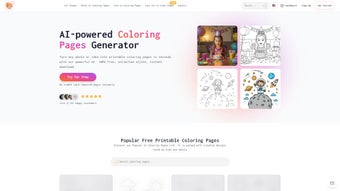
Best Coloring Pages is an AI‑driven web application designed to turn imagination into printable artwork within moments. The platform operates entirely in the browser, so users avoid the hassle of downloading bulky installers or maintaining a local software library. By simply entering a textual description—such as “a whimsical forest with friendly foxes” or “an Art‑Deco style cityscape”—the AI crafts a high‑contrast line drawing ready for coloring.
Alternatively, users can upload a personal photograph; the service automatically traces the image, extracting bold outlines that retain the subject’s essence while simplifying details for coloring. All outputs are delivered as vector‑based PDFs, guaranteeing crisp edges at any print size from A4 to poster‑scale. The free tier includes a curated library of pre‑made pages featuring popular cartoons, animals, and seasonal themes, while a modest subscription unlocks unlimited generations, advanced style controls, and premium line‑weight adjustments.
Security is baked into the workflow: uploads are encrypted in transit, processed on secure servers, and purged within 30 minutes, ensuring privacy for families and schools. Regular model updates introduce new artistic styles and improve tracing accuracy, keeping the tool fresh and relevant. In essence, Best Coloring Pages offers a versatile, secure, and constantly evolving solution that brings custom coloring sheets to anyone with an internet connection, making creative expression accessible without barriers.
Key Features & Capabilities
- Text‑to‑Coloring Page Generation: Describe any scene, character, or pattern, and the AI produces a ready‑to‑print outline.
- Photo‑to‑Coloring Page Conversion: Upload a personal photo or artwork; the system automatically extracts clean line art.
- Multiple Difficulty Levels: Choose from simple outlines for toddlers or complex designs for adult relaxation.
- Unlimited Style Library: Access an ever‑growing collection of themes, from classic cartoons to modern video‑game motifs.
- Customizable Line Thickness & Detail: Fine‑tune the stroke weight to suit crayons, markers, or fine‑point pens.
- High‑Quality PDF Export: Download vector‑based PDFs that retain crisp edges at any print size.
- Cross‑Platform Web Access: No software download required; works on Windows, macOS, Linux, Android, and iOS browsers.
- Secure Cloud Processing: All uploads are encrypted, processed server‑side, and deleted after rendering.
- Family Collaboration Mode: Share a private workspace where multiple users can co‑create coloring sheets.
- Regular AI Model Updates: New artistic styles and improved tracing algorithms are rolled out monthly.
Beyond the checklist, each feature integrates seamlessly to create a fluid user experience. The text generation engine leverages a large‑scale diffusion model fine‑tuned on line‑art datasets, allowing it to interpret nuanced prompts like “Victorian‑style floral mandala with a hidden butterfly.” Meanwhile, the photo‑tracing pipeline uses edge‑detection algorithms that preserve the silhouette while stripping away color gradients, producing bold shapes ideal for crayons or markers. The line‑thickness slider is especially valuable for educators who need thicker outlines for younger children, while seasoned artists can opt for delicate strokes to achieve intricate designs.
Because the service runs on cloud infrastructure, even low‑end tablets can render complex images without lag, and the PDF export ensures that the final product is resolution‑independent, making it perfect for home printers or professional print shops. The collaborative workspace further extends the platform’s utility in classroom settings, enabling teachers to assign group projects where each student contributes a prompt and collectively downloads a cohesive set of pages. Overall, the feature set reflects a thoughtful balance between creativity, accessibility, and technical robustness.
Installation, Usage & Compatibility
Getting Started – No Installation Required
Best Coloring Pages lives entirely in the browser, so the first step is simply to navigate to the official website using any modern browser (Chrome, Firefox, Safari, Edge, or Opera). The site automatically detects your device type and presents an optimized layout, ensuring smooth performance on desktops, laptops, tablets, and smartphones alike. Because no installer is needed, you can begin creating coloring pages within seconds, making the tool ideal for quick classroom activities or spontaneous family fun.
Step‑by‑Step Workflow
- Create an Account: Register with an email address or use a single‑sign‑on option (Google, Apple). The free tier grants three daily generations, sufficient for casual use.
- Select Generation Mode: Choose “Text” to type a description or “Photo” to upload an image. For text, you can also pick a preset style (e.g., “Kids Simple”, “Adult Intricate”).
- Adjust Settings: Use sliders to set line thickness, level of detail, and page size (A4, Letter, Custom). A live preview shows changes in real time.
- Generate & Review: Click “Create” and let the AI process your request (typically under 10 seconds). If the result needs tweaking, refine the prompt or settings and regenerate.
- Download PDF: Once satisfied, download the vector PDF. The file is ready for printing on any printer or for sharing digitally.
- Print or Share: Print at home, at a local print shop, or distribute electronically to friends and family.
Operating System Compatibility
Web‑based (compatible with Windows, macOS, Linux, Chrome OS, Android, and iOS browsers)
The platform leverages HTML5 Canvas and WebAssembly for fast image processing, guaranteeing consistent results across operating systems. Because the heavy lifting occurs on secure cloud servers, even older devices can generate high‑quality coloring pages without taxing local CPU or memory. Whether you are on a Windows 11 laptop, a macOS Ventura desktop, an Android tablet, or an iPhone running iOS 17, the experience remains fluid and responsive.
Pros, Cons, FAQ & Final Verdict
Pros
- Instant, no‑install access from any device.
- AI generates both text‑based and photo‑based coloring pages.
- Wide range of difficulty levels for all ages.
- High‑resolution PDF output ensures crisp prints.
- Secure, encrypted processing protects user data.
- Regular updates add new styles and improve accuracy.
- Collaboration workspace ideal for classrooms and families.
- Free tier available for casual users.
Cons
- Free tier limits daily generations to three pages.
- Subscription required for unlimited high‑detail outputs.
- Complex prompts may need several iterations for perfect results.
- Currently only PDF export; SVG/PNG support is planned but not yet available.
- Performance depends on internet speed since processing is cloud‑based.
Frequently Asked Questions
Can I use Best Coloring Pages on a mobile phone?
Yes. The web app is fully responsive and works in any modern mobile browser on Android or iOS. All features, including text generation and photo upload, are available on handheld devices.
Is my uploaded photo stored after conversion?
No. Uploaded images are encrypted during processing and automatically deleted from the server within 30 minutes of conversion, ensuring privacy.
Do I need a subscription to download PDFs?
The free plan allows up to three PDF downloads per day. For unlimited access, the paid subscription removes all generation limits and unlocks premium styles.
What file formats are supported for export?
Currently the platform exports only PDF files, which preserve vector data for scaling. Future updates may include SVG and PNG options.
Can I collaborate with others on the same coloring project?
Yes. The “Family Collaboration” feature lets you share a private workspace where multiple users can add prompts, upload images, and download the resulting pages.
Overall Rating: 4.6/5 – Best Coloring Pages delivers a powerful, user‑friendly AI solution for creating custom coloring sheets, making it a top choice for families, educators, and hobbyists alike.
Conclusion
Best Coloring Pages stands out as a secure, cross‑platform AI tool that transforms imagination into printable art with just a few clicks. Its blend of text‑driven creativity, photo‑tracing precision, and a rich library of free themes provides unmatched flexibility for users of any age or skill level. While the free tier is modest, the subscription cost is justified by unlimited generations, premium styles, and continuous AI enhancements. If you’re searching for a modern, hassle‑free way to generate personalized coloring pages for home, school, or therapeutic relaxation, this web app is worth the download.
Start your free trial today and experience the joy of instant, custom coloring creations.



.png)



